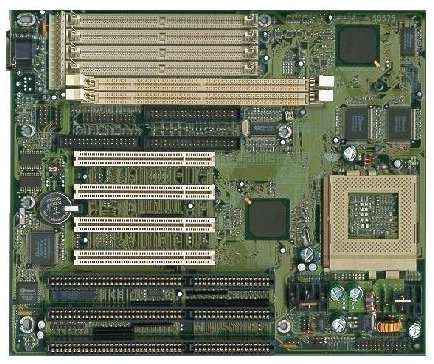
| Power Connectors |
| Here is where a power supply would connect sending (and recieving) power to the mainboard. 5 and 12 volts is sent to the mainboard the mainboard returns 5 volts to the power supply IF there are no short circuits or no components are drawing too much voltage |
| click here to Return to the top of this page |
| Memmory Slots |
| These are the memmory slots for 2 168 pin DIMM modules and 4 72 pin SIMM, early 486 (and prior) mainboards used a 30 pin module. These memmory modules are keyed to fit in only 1 direction |
| click here to Return to the top of this page |
| Cache Memmory |
| Cache memmory is a very fast memmory used by some OSes and programs that can greatly increase the access to memmory that is used again and again by the processor to work out problems or equations. This Cache memmory is soldered directly to the mainboard, but in many computers there are slots or sockets for the cache memmory. |
| click here to Return to the top of this page |
| Voltage Regulator |
| This area of the mother board controls the voltage going to the processor and memmory it takes the 5 volts coming in from the power supply and regulates it down to between 2 and 5 volts depending on the CPU selected, and the memmory type installed. Most 486 DX2 (and newer) processors require the voltage to be 3.3 volts and lower. |
| click here to Return to the top of this page |
| BIOS |
| the BIOS (Basic In / Out System (often called CMOS)) is a chip on the mainboard that is somewhere between software and hardware, it is hardware but it runs code (software) that allows the programs being run to use the systems resources. The OSes (Operating Systems) (such as Windows95) are getting smarter and smarter these days relying less on the BIOS to get things done. Flash upgradeable BIOSes of today can usually be upgraded with a program that erases the old code and writes new code in the BIOS, these Flash upgrades can offer better support for plug & play, larger hard disks, faster CPUs, etc. |
| click here to Return to the top of this page |
| PCI Slots |
| PCI Expansion slots are for add in cards that You may wish to upgrade Your computer with, such as a TV tuner card, modem, sound card, graphics accelerator, etc. They are replacing the older ISA slots which are much slower than PCI |
| click here to Return to the top of this page |
| IDE Connectors |
| These connectors are for the onboard super I / O (in / out)controllers. this mainboard has primary and secondary controllers each capable of controlling 2 IDE drives. these connectors usually have pin 1 maked on the mainboard used to connect to pin 1 (side with the red stripe) of the ribbon cable. |
| click here to Return to the top of this page |
| Serial Ports |
| Serial ports (often called com ports) are used to connect a serial mouse, external modem, another computer, etc. these connectors usually have pin 1 maked on the mainboard used to connect to pin 1 (side with the red stripe) of the ribbon cable. |
| click here to Return to the top of this page |
| Keyboard connector |
| This jack if for the Keyboard (imagine that huh ??) there is little I can say about this jack except that it comes in 2 sizes, standard and PS/2 (which is the smaller one (like the mouse)) |
| click here to Return to the top of this page |
| Floppy Connector |
| Use to connect floppy drives or LS120 tape drives, these connectors usually have pin 1 maked on the mainboard used to connect to pin 1 (side with the red stripe) of the ribbon cable. |
| click here to Return to the top of this page |
| LPT Port Connector |
| LPT ports (printer ports) are used to connect a printer or other device. These connectors usually have pin 1 maked on the mainboard used to connect to pin 1 (side with the red stripe) of the ribbon cable. |
| click here to Return to the top of this page |
| CPU Zif Socket |
| Zif (Zero Insertion Force) meaning there is no pressure to seat the CPU (Central Processing Unit) in the socket, simply lifting the arm releases the socket for easy installation and removal of the processor. The area in the middle of the socket is not part of the socket but the motherboard itself. |
| click here to Return to the top of this page |
| Chipset |
| The chipset is the most important part of any mainboard, a chipset will determine the overall speed of a computer and it's stability. A good motherboard can also make a processor more likely to to be "OverClocked" meaning that You can run a processor faster than the manufacturer rated it. |
| click here to Return to the top of this page |
| Mounting holes |
| These are holes to be used when mounting the mainboard, usually they are reinforced with metal to protect the mainboard from splitting. If using a mounting hole that isn't reinforced You can either use washers (fiber against the mainboard) or plastic standoffs. |
| click here to Return to the top of this page |
| My Notes |
- A CPU (Central Processing Unit) is the main processor (usually ceramic) on a mainboard, how CPU came to mean the computer's case I'll never know ?
- Floppy drives will be ruined if power is plugged in backwards, the plug saddles the jack and fits very nice and neetly. Never force any connections on a computer or memmory modules. Thanks Mark for Your experiments *grin*
- Back up only the data that can't be replaced, The install programs on Your CD isn't going to be wiped out if You lose everything... so just back up the data You create (look at the dates too) usually You will find that it is really very small and can fit on floppy disks.
- Floppy disks are slow... use them for backing up data not working on files located on floppies.
- Learn to use a good compression program, for example Winzip for Windows. Many don't know why they should use compression utilities, I prefer to use Winzip to back up a friend's database that has many records... when I zip her 3 files (407,154 bytes) that make up her database it only requires 1 file (100,121 bytes) that can be named anything (I use the Comapany name and date) I want. So, for this example I can have 14 compressed backups or 3 uncompressed backups on 1 floppy disk.
- Keep several backups (if possible) just in the chance that the last one or 2 are found to be corrupt.
|
| click here to Return to the top of this page |
|